“The pricing looked fine until the invoice arrived.”
This post started as notes I kept while building a production agentic system. Somewhere between the pricing page and the first real invoice, something broke in my mental model. This is what I wish I’d known earlier.
Three things to cover: caching (the thing everyone skips), model selection (harder than it looks), and routing (the underrated lever).
Part 1 - caching, or: why everyone gets surprised by their first invoice
the mental model is wrong from the start
When most people estimate LLM costs, they think: user sends a message, model responds, repeat. Input: a few hundred tokens. Output: a few hundred tokens. Multiply by price, done.
That works fine for a chatbot. It breaks completely for agents.
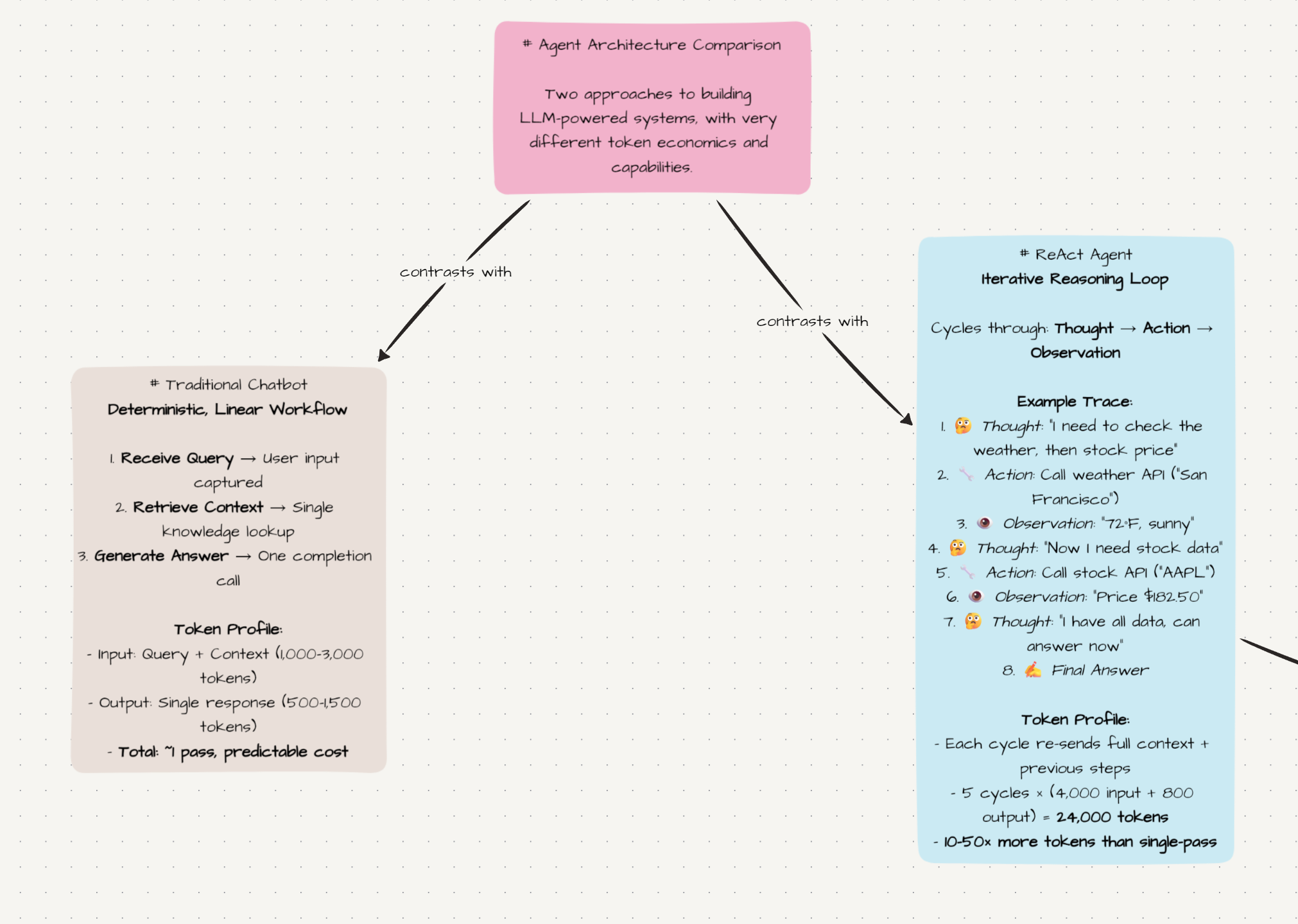
Here’s what actually goes into a single model call in an agentic system:
- System prompt - instructions, tool schemas, behavioral rules. Usually 500–2,000 tokens.
- Conversation history - every prior message, every prior response. Grows with every step. Even with conversation compression (which you’ll need at some point to keep the context manageable), it’s easy to hit 30k–40k tokens once the conversation drags on long enough.
- Tool call records - both the arguments you sent and the results you got back. A single web search result can inject 5,000–15,000 tokens of raw page content into the context.
- Reasoning traces - if the model thinks before acting, that thinking goes into the next step’s context too.
At step 1, you might send 3,000 tokens. At step 3, you’re at 25,000. At step 6, 60,000. This is not an edge case - it’s how every agentic system behaves. The context accumulates at every step because the model needs the full history to stay coherent.
Claude Code, which is one of the more production-ready agentic coding systems out there, regularly burns 100,000–200,000 tokens per turn on complex tasks. This is part of why Anthropic’s offering is heavily subsidized - the raw API economics at that scale don’t close for most consumers.
Concrete example. A 5-step agent run, 25,000 input tokens per step, 1,000 output tokens per step, Claude Sonnet at 15/M output:
Input:  5 × 25,000 × $3/M    = $0.375
Output: 5 × 1,000  × $15/M   = $0.075
Total per agent run            $0.45
One user query. 67.50/user/month in API costs. At €15/month pricing, that’s not a business.
what caching actually does
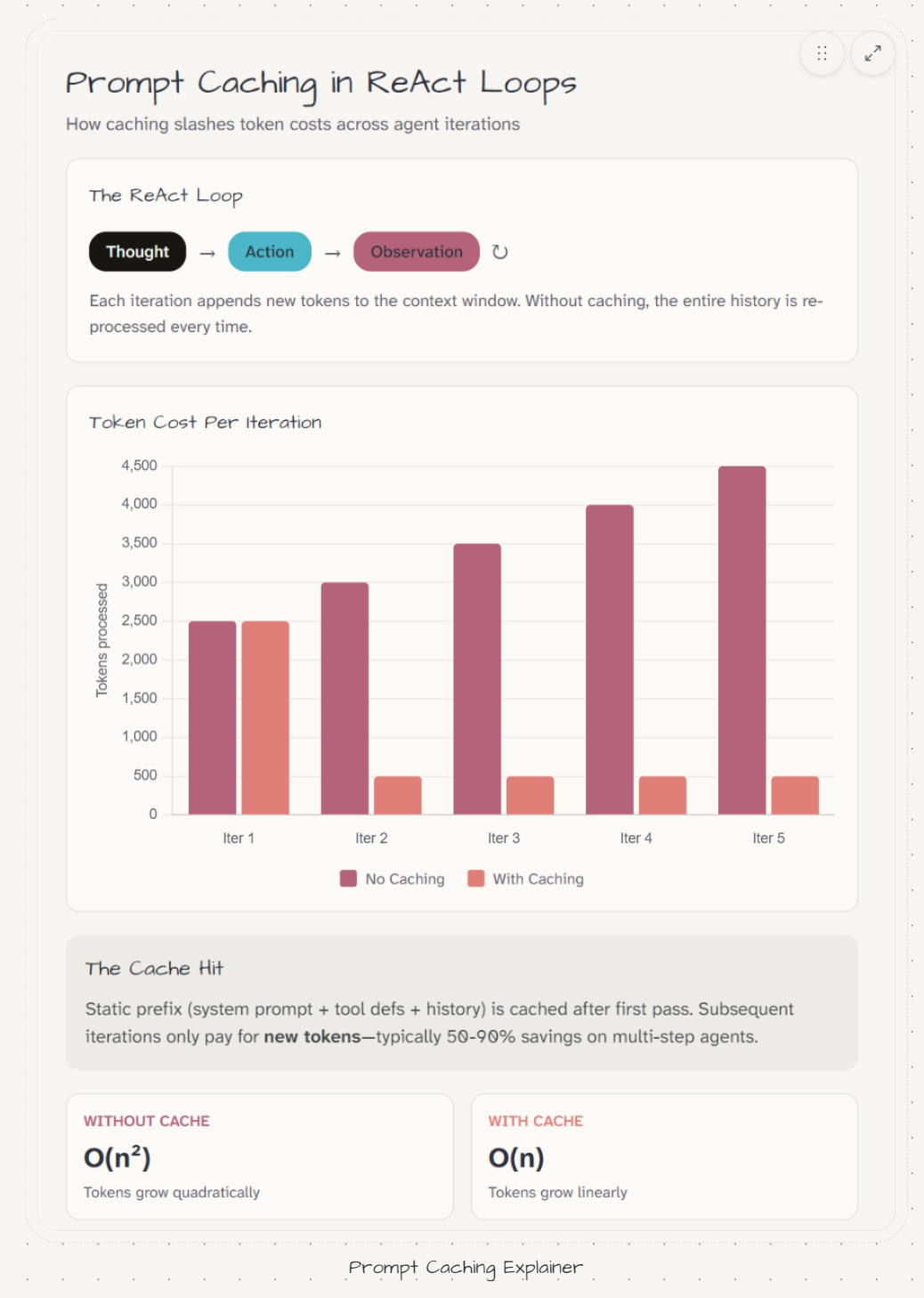
The key observation: across consecutive steps of the same agent run, most of the context is identical. Step 2 shares the same system prompt, the same conversation history, and the same tool schemas as step 1. Only the last few thousand tokens differ - the new tool result, the new reasoning block.
Why pay full price for tokens you already sent one step ago?
Prefix caching answers this. If the beginning of your prompt matches a recent request from the same account, those tokens are served from cache at a reduced rate - typically 75–90% cheaper than full input price.
OpenAI - automatic, no configuration needed. Minimum 1,024 tokens (not a problem for any real agent). The cache key is the exact byte sequence of your prompt prefix, so the only requirement is that the beginning of your messages array stays stable across requests. Dynamic content belongs at the end, not the front. Don’t inject timestamps or user IDs into your system prompt - that breaks the prefix match every time (I imagine you will need timestamps, in that case remember to normalize, round to day for example)
One thing I’ve seen people try: managing cache names explicitly. Don’t. OpenAI’s automatic system is smarter than whatever you’ll configure manually.
Anthropic - requires explicit cache_control markers. Add them to the blocks you want cached:
messages = [
    {
        "role": "user",
        "content": [
            {
                "type": "text",
                "text": full_conversation_history,
                "cache_control": {"type": "ephemeral"}  # mark the stable boundary
            },
            {
                "type": "text",
                "text": new_user_message  # dynamic - not cached
            }
        ]
    }
]
Minimum 1,024 tokens for Haiku, 4,096 for Sonnet. Worth knowing - if your prompt doesn’t hit the threshold, nothing gets cached even if you’ve marked it.
Most others (Gemini, Qwen, Kimi, GLM) - automatic prefix caching, works like OpenAI. Same discipline: stable prefix at the front, dynamic content at the end.
The same 5-step run with caching enabled (at 10% cache read price):
Step 1: 25,000 tokens - cold miss, full price:         $0.075
Step 2: 27,000 tokens - 25,000 cached at $0.30/M:     $0.014
Step 3: 29,000 tokens - 27,000 cached at $0.30/M:     $0.014
Step 4: 31,000 tokens - 29,000 cached at $0.30/M:     $0.015
Step 5: 33,000 tokens - 31,000 cached at $0.30/M:     $0.015
Total with caching:                                    ~$0.133  (vs $0.375)
64% reduction on input costs. No change to the model, the prompt, or what the user sees.
One thing to verify before assuming caching is working: check cache_read_input_tokens in the usage response. I ran a full production test thinking caching was active - it wasn’t. A session ID injected into the system prompt was breaking the prefix match on every request. (wth 🥲)
usage = response.usage
print("prompt_tokens:", usage.prompt_tokens)
print("cache_read:", getattr(usage, "cache_read_input_tokens", 0))
# if this is always 0, caching is not working
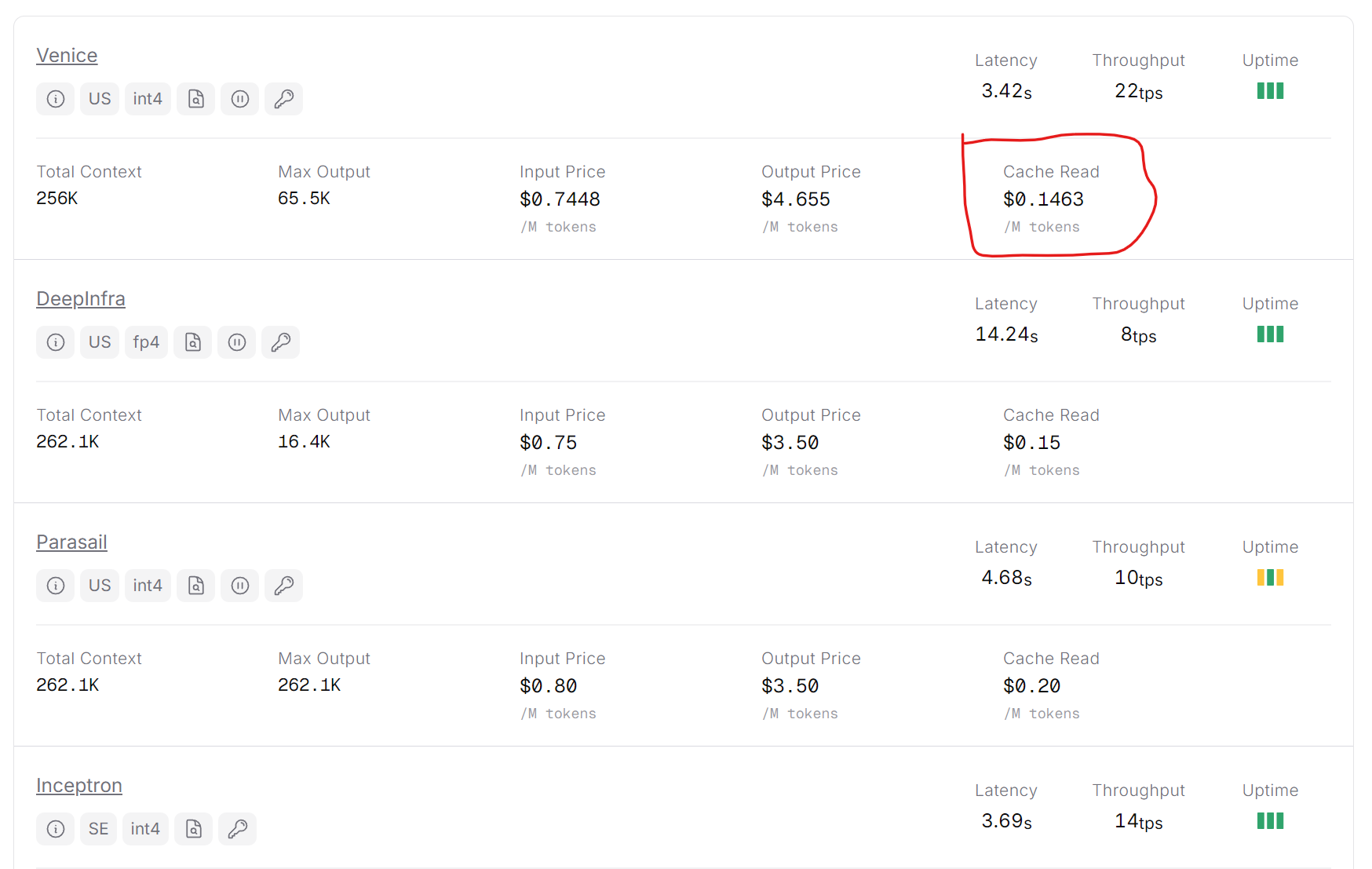
If you serve models via OpenRouter, make sure the listed provider has prompt caching offered
Part 2 - model selection, or: benchmarks that actually matter
Now that the cost picture makes sense, there’s a natural next move: find models that support caching, perform well, and don’t cost a fortune. This is where the second mistake usually happens - optimizing on price alone, then discovering the agent fails in interesting ways.
Model selection for agentic systems isn’t one-dimensional. Here are the axes that actually matter.
Coding - SWE-bench Pro, not SWE-bench Verified. The Verified benchmark has been significantly contaminated through training data exposure - OpenAI stopped reporting Verified scores internally for exactly this reason. A model that scores 73% on Verified might score 25% on Pro. Terminal-Bench 2.0 is more realistic for execution-heavy tasks. If your agent runs code, these numbers matter more than any other benchmark.
Instruction adherence - chronically underrated. IFBench tests multi-constraint following, including negative constraints (“do X but never Y”). A model that routinely adds unrequested preambles or “improves” things you didn’t ask to be improved will frustrate users regardless of how good its reasoning is.
Tool use efficiency - by which I mean the inverse of tool spam. The best agentic models call tools once, with correct arguments, then move on. Worse models verify everything twice, re-confirm results they already have, and generate verbose reasoning between tool calls. This bloats output tokens, inflates the next step’s context, and slows every interaction. τ²-bench (tau-bench) is the most relevant benchmark here - it measures multi-turn stability under tool invocations, not just single-call accuracy.
Verbosity - directly tied to cost. A model that outputs 2× more tokens than needed doubles output cost and adds those tokens to the next step’s input. Over a 10-step chain, verbosity compounds fast. Check this empirically on your own workload - benchmark numbers don’t always predict real output length.
which models are worth your time
OpenAI and Gemini sit at the top of real-world agentic reliability. GPT-5.4 mini achieves 60% on Terminal-Bench 2.0 and 72.1% on OSWorld computer use - benchmarks that test actual task completion in real environments. Gemini 3 Flash scores 78% on SWE-bench Verified and has been independently confirmed by JetBrains, Devin, and Cursor as solid for production coding agent loops. Both support automatic prefix caching with no configuration overhead. Predictable, fast, well-documented - the sensible defaults for teams that need reliability first.
Chinese models are closing the gap faster than most people realize, and at prices that make consumer AI product economics suddenly viable:
- Qwen 3.5 Plus - 1.56 per million tokens, #1 on IFBench instruction following globally, 1M context window. For agentic systems where instruction adherence matters, this is hard to beat at the price.
- GLM-4.7 - leads open-source tool use on τ²-bench. Has a feature called Preserved Thinking that maintains reasoning continuity across tool call boundaries - the model doesn’t “forget” its plan when a tool returns. Useful for multi-step agents that keep losing the thread.
- DeepSeek V3.2 - the cheapest model with genuinely frontier-level reasoning. Trained on 85,000 complex agentic prompts across 1,800 environments. Very verbose by default though, which is a real cost at scale. (As I’m writing this article, DeepSeek V4 will soon be released, what a time!)
And there’re also MiniMax, Kimi, .. the list goes on (and honestly, all of these models are comparable both in terms of performance and pricing, so take your time to make sure you pick the best model for your tasks)
The practical entry point for all of these is OpenRouter - one API, usage analytics, automatic fallbacks, switch models with a one-line change. One tip that matters in production: use the :nitro suffix on the model ID (qwen/qwen3.5-plus-02-15:nitro). Nitro routes your request to the highest-throughput provider available rather than the cheapest. For interactive agent loops where latency compounds across steps, this is worth it.
GDPR caveat if you’re building for European users: Chinese models store data on servers in China. For a French product this is a real compliance question, not a hypothetical. Gemini and Mistral are the GDPR-safe alternatives with serious performance at reasonable prices.
Part 3 - routing, or: don’t pay for a Ferrari to go to the supermarket
The third lever - the one that ties the other two together - is routing.
Not every query needs your best model. Most don’t. “Summarize this document” and “refactor this entire module to async and update all the tests” are very different problems. Routing means making this distinction automatically and paying accordingly.
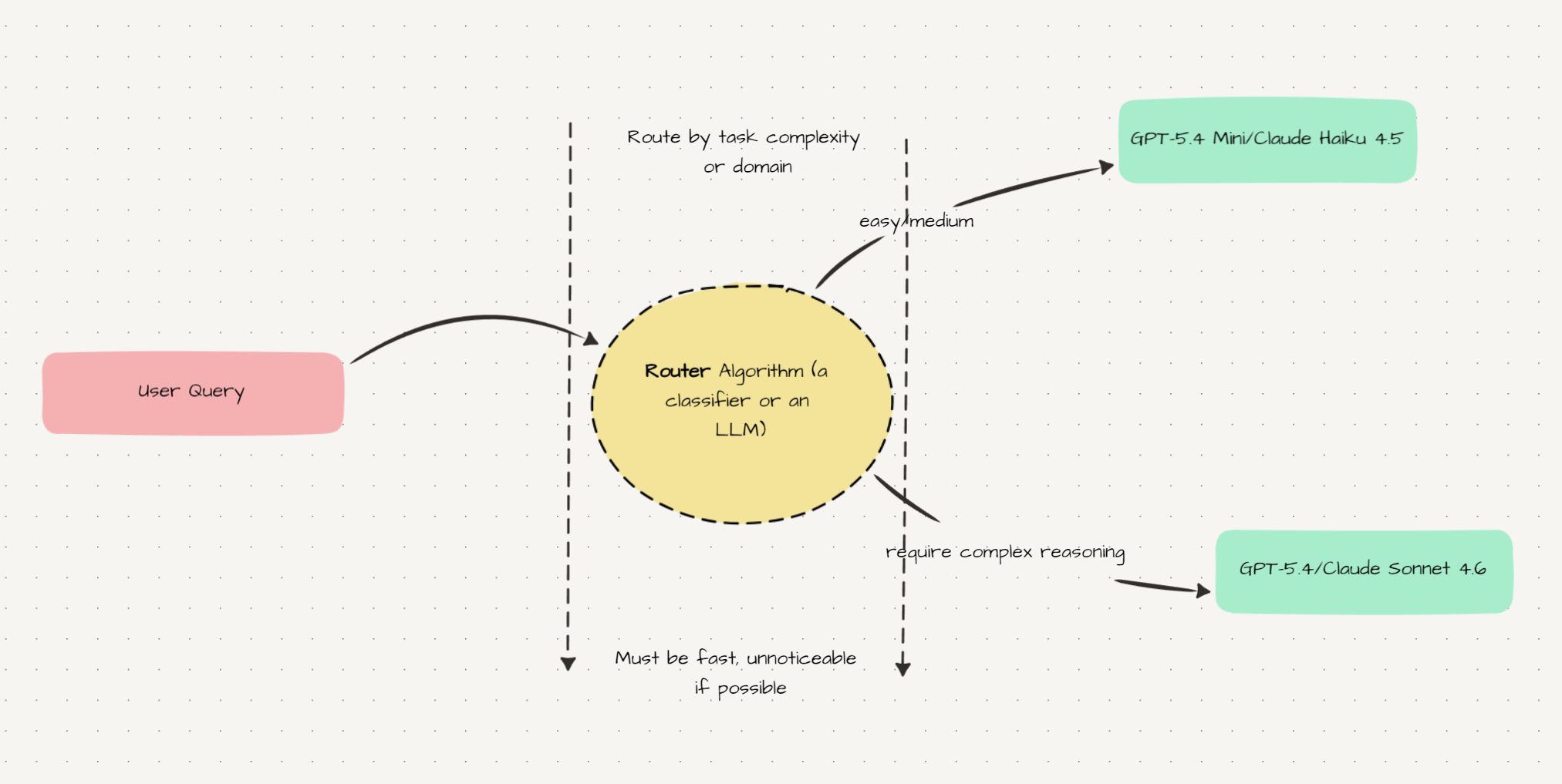
There are several approaches. RouteLLM, from LMSYS (the team behind Chatbot Arena), is an open-source framework that trains a lightweight classifier on human preference data to predict when a strong model is necessary - demonstrated 85% cost reduction on MT Bench while maintaining 95% of GPT-4’s performance. OpenRouter has its own built-in router (openrouter/auto). Not-Diamond is a commercial option.
All of them have the same problem: you don’t control which models they route to. You’re trusting someone else’s routing logic, optimized for someone else’s definition of “good.” For a product with specific domain requirements, that’s a real limitation.
My current setup: use a fast, cheap, open-weight model as a custom router. Specifically openai/gpt-oss-120b:nitro on OpenRouter.
This model runs at 400–500 tokens per second on Cerebras. A routing decision adds roughly 40ms of latency - below the threshold of human perception. Priced at 0.19 per million tokens, a typical routing call costs essentially nothing. And you write the routing prompt yourself:
from openai import OpenAI
import json

client = OpenAI(
    base_url="https://openrouter.ai/api/v1",
    api_key="your_openrouter_key"
)

ROUTING_PROMPT = """You are a request complexity classifier.

Classify into one of three tiers:
- "fast": simple questions, short summaries, lookups, formatting
- "standard": multi-step reasoning, code explanation, moderate research
- "complex": large refactors, deep reasoning, ambiguous multi-constraint tasks

Return JSON only: {"tier": "fast"|"standard"|"complex"}"""

def route(user_message: str) -> str:
    response = client.chat.completions.create(
        model="openai/gpt-oss-120b:nitro",
        messages=[
            {"role": "system", "content": ROUTING_PROMPT},
            {"role": "user", "content": user_message[:500]}
        ],
        response_format={"type": "json_object"},
        max_tokens=20
    )
    return json.loads(response.choices[0].message.content)["tier"]

MODELS = {
    "fast":     "openai/gpt-oss-20b:nitro",
    "standard": "qwen/qwen3.5-plus-02-15:nitro",
    "complex":  "anthropic/claude-opus-4-6:nitro",
}
Cost per routing call: ~0.023 to route everything.
The real advantage over black-box routers: you decide what “complex” means for your product. A legal research tool has a very different complexity threshold than a coding assistant. You can add domain-specific signals - does the message contain a code block? a file attachment? a specific keyword? - without retraining anything. It’s just a prompt.
With this setup, 70% of requests go to the cheap model, 25% to mid-tier, 5% to frontier. Blended cost per message drops by roughly 60% compared to routing everything to the expensive default.
take-home
If you remember nothing else from this post:
- Check that caching is actually working.
cache_read_input_tokensin the usage response. If it’s always 0, something in your prefix is changing every request - probably a timestamp or session ID in your system prompt. - Benchmark on what matters for agents. SWE-bench Pro over Verified. τ²-bench for tool use. IFBench for instruction following. Verbosity is a cost axis - measure it on your own workload.
- Build your own router. gpt-oss-120b on OpenRouter, 400–500 t/s, $0.000023 per call. Write the routing prompt yourself. Don’t outsource the routing decision to a black box when you can control it with a dozen lines of code.
The goal isn’t the cheapest model. It’s the right model for each request, with the shared context already cached.